There is no universal answer to how many sensors a LoRaWAN gateway can support: its LoRaWAN concentrator hardware sets reception capabilities, while message traffic, airtime and site conditions determine usable capacity. Sensor count alone excludes the effect of acknowledgements, retransmissions and competing radio traffic. Size the network around delivered messages and acceptable data gaps, not a headline device limit.
- How many sensors can a LoRaWAN gateway support? There is no fixed limit independent of traffic and radio conditions.
- LoRaWAN gateway channel count is not a sensor limit; reporting intervals and airtime determine the workload.
- Frequent acknowledgements add downlink traffic and can reduce the capacity available for sensor messages.
- Kilo Electronics suits buyers comparing LoRaWAN hardware across manufacturers; gateway capacity still needs deployment-specific assessment.
How many LoRaWAN sensors can one gateway support?
A gateway supports the sensor population whose combined traffic it can receive with the reliability your application needs. That population changes when you alter message frequency, payload size, radio settings or gateway placement—even when the hardware stays the same.
A LoRaWAN sensor does not occupy a permanent gateway connection in the way a wired device occupies a switch port. It transmits radio packets that any compatible gateway within reception range can hear. The network server processes those packets and removes duplicates received through multiple gateways.
That distinction explains why a device-registration limit is not a radio-capacity figure. A network service can permit you to register devices without proving that their messages will arrive reliably at a particular site.
| Deployment pattern | Best for | Capacity advantage | Main limitation |
|---|---|---|---|
| Infrequent, short readings | Slow-changing environmental measurements | Less transmitted airtime per sensor | Longer gaps between scheduled updates |
| Frequent, short readings | Measurements needing regular updates | Keeps individual payloads small | Higher message volume increases contention |
| Longer payloads | Measurements that need several values together | Combines useful information in one message | Longer transmissions occupy more airtime |
| Confirmed uplinks | Selected messages needing network acknowledgement | Confirms network receipt when acknowledgement succeeds | Adds downlinks and possible retransmissions |
| Event-driven reporting | Changes that matter more than regular samples | Avoids unnecessary routine transmissions | Shared events can trigger simultaneous traffic bursts |
These are traffic patterns, not hardware tiers. A building can contain several of them, so assess the combined workload rather than treating every sensor as identical.
Why gateway capacity matters before you buy
An undersized design does not necessarily fail by refusing the next sensor. Instead, you can see missing readings, delayed updates or unreliable acknowledgements. Those symptoms matter differently to a hobby dashboard, a building-monitoring application and a business process that depends on timely alarms.
Separate the system into its working parts. The sensor measures and transmits; the gateway receives radio traffic and forwards it over an internet connection; the network server manages LoRaWAN communication; the application decodes and uses the measurements.
A gateway receiving a packet is not the same as your application receiving a usable reading. Backhaul, server configuration and payload decoding can interrupt delivery even when radio reception succeeds. Buying another gateway will not fix an incorrect decoder.
Why the number of supported sensors varies
Reporting interval
Reporting interval determines how often each sensor contributes traffic. Shortening that interval increases the workload even if the number of installed sensors remains unchanged.
Choose the interval from the application requirement. A slowly changing room temperature and an urgent leak alarm do not need the same reporting policy. Where the device supports it, separate routine measurements from event messages rather than sending every reading as though it were urgent.
Payload size
The payload contains the measurement data carried in a message. Larger payloads generally require more airtime when other radio settings remain equal, but payload size alone does not describe the complete transmission: protocol overhead also matters.
Combining measurements can reduce repeated overhead compared with sending each value separately. The trade-off is freshness: waiting to assemble a batch delays the earlier readings. Use batching only where that delay fits the application.
Spreading factor and radio conditions
Spreading factor is a LoRa radio setting that affects transmission duration and reception sensitivity. At otherwise comparable settings, a higher spreading factor uses more airtime. A distant sensor or a difficult indoor location can therefore create more radio load than a nearby sensor sending the same payload.
Improving gateway or antenna placement can help devices communicate with shorter airtime settings where the radio link permits. Adaptive Data Rate, a LoRaWAN mechanism for adjusting transmission settings, helps suitable devices use the link efficiently; it does not remove the need for good coverage.
Acknowledgements and downlinks
A confirmed uplink requests an acknowledgement from the network. That acknowledgement uses a downlink: a transmission from the gateway towards the sensor. Device commands and some network-management messages also need downlinks.
Downlink use matters because gateways have transmission constraints, and transmission can affect reception depending on the hardware. Missing acknowledgements can also lead to retransmissions. Request confirmation selectively instead of treating it as a free reliability setting.
Reception capabilities and channel configuration
A gateway's supported channels and demodulation capabilities affect which transmissions it can receive concurrently. They do not assign a dedicated channel to each sensor, and they do not translate directly into a device count.
Match the gateway and sensors to the intended regional channel plan. For European deployments, including projects in the EU, UK and Switzerland, confirm the applicable radio requirements rather than assuming that any product described as LoRaWAN will suit every destination.
Traffic bursts and neighbouring networks
Average traffic hides busy periods. Sensors that restart together, react to the same event or send on synchronised schedules can create concentrated bursts. Other users of the shared radio spectrum also affect reception.
Where device settings allow it, distribute routine transmissions over time. Keep the important distinction clear: reducing synchronisation improves the traffic pattern, but it does not reserve spectrum or guarantee delivery.
How do you estimate LoRaWAN gateway capacity?
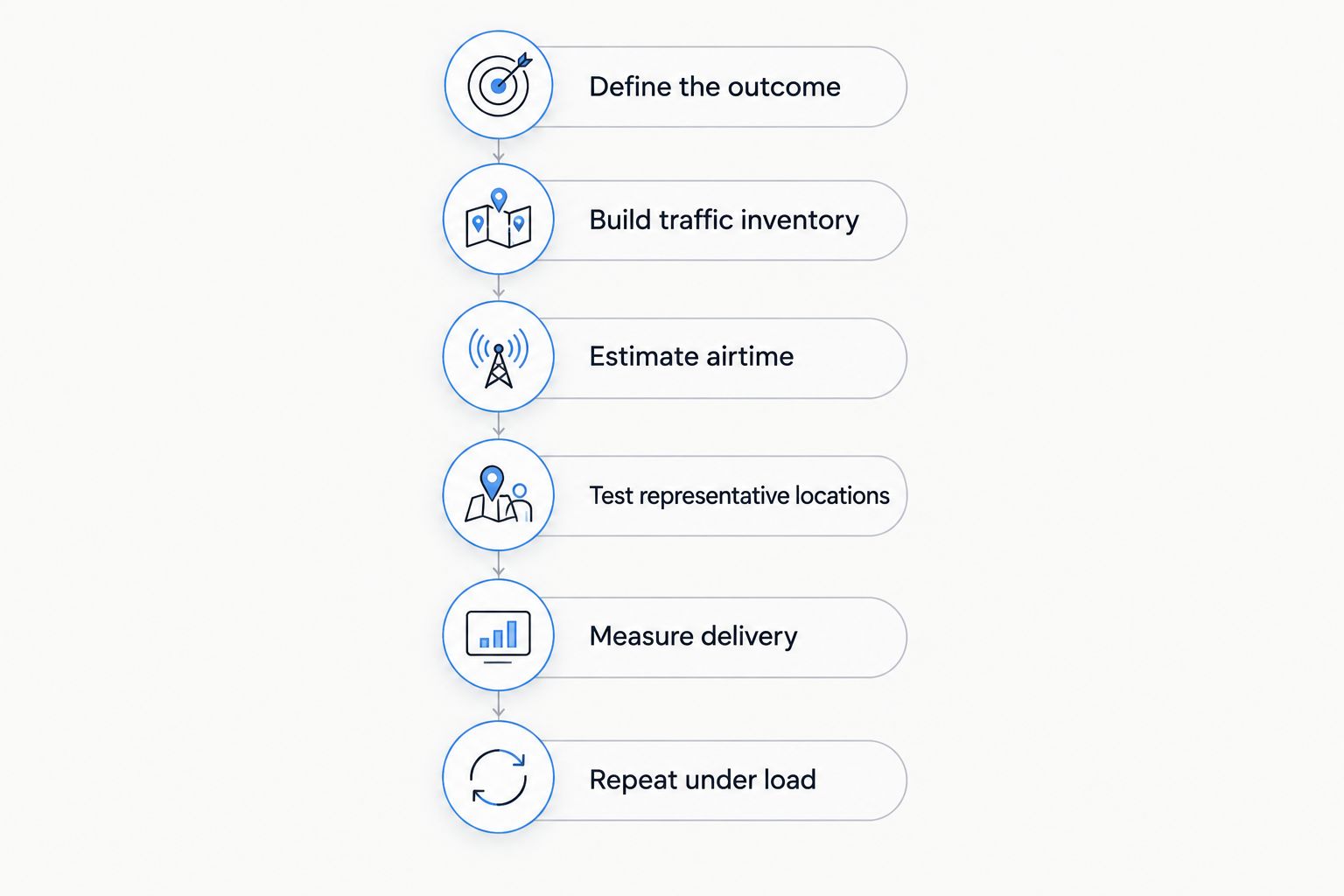
Build the estimate from the messages the deployment must carry. The aim is not to produce an impressive maximum; it is to show that the expected workload meets an explicit delivery requirement.
- Define the required outcome. Record the acceptable update delay, tolerated missing readings and treatment of alarms. Distinguish a useful monitoring service from a requirement for guaranteed real-time delivery.
- Build a traffic inventory. Group sensors by payload, reporting interval, event behaviour and use of confirmed messages. Include join activity and device commands where relevant.
- Estimate airtime. Use the actual radio settings and message format with a suitable LoRa airtime calculation. Include protocol overhead rather than calculating from application payload alone.
- Test representative locations. Include difficult mounting positions, not just a sensor beside the gateway. Record reception quality and the settings devices actually use.
- Measure end-to-end delivery. Compare expected readings with readings reaching the application. Examine missing messages alongside gateway, network-server and application records.
- Repeat under realistic load. Test the intended reporting schedules, event bursts and downlink behaviour. Reassess after changing the sensor population or installation layout.
The arithmetic begins with a simple relationship: messages per sensor during an observation period multiplied by the number of sensors gives expected messages during that period. Adding each message's airtime describes offered radio load—not guaranteed successful delivery.
Collisions, interference, receive capabilities and downlink scheduling prevent you from converting aggregate airtime into a dependable sensor limit with a simple division. Retain the traffic assumptions alongside the result so that a later reporting change triggers a meaningful reassessment.
Does gateway channel count equal sensor capacity?
No. Channel count describes radio reception resources, not the number of sensors you can register or reliably operate. Multiple devices share those resources over time, and packet reception depends on when and how they transmit.
A specification listing more reception resources can be relevant to a busy network. It still does not prove better results for a particular installation without considering antenna placement, traffic distribution and the exact gateway implementation.
Do not confuse a LoRa radio module with a complete multi-channel LoRaWAN gateway either. For a custom build, establish what the concentrator, host system and packet-forwarding software each provide. For a finished gateway, assess the complete device rather than inferring its capabilities from one component name.
Will another gateway let you add more sensors?
Another gateway can improve coverage and reception diversity: the same sensor transmission can reach more than one receiving location. It does not automatically double usable capacity, because sensors still share radio spectrum and the gateways can hear overlapping traffic.
Place an additional gateway where it addresses a demonstrated problem. That might be a shielded area, poor reception at the edge of a site or an operational requirement to avoid relying on one receiving location.
The trade-off is additional installation and maintenance. Account for mounting, antennas, power, network access and management. A gateway with cellular backhaul also needs a suitable mobile connection; cellular backhaul does not turn the LoRaWAN sensors into NB-IoT devices.
Should every sensor message request an acknowledgement?
No. Use confirmed messages where network acknowledgement serves a defined requirement, rather than enabling them indiscriminately. An acknowledgement confirms network receipt; it does not prove that an application has decoded the measurement or acted on it.
For routine trends, occasional missing readings can be less damaging than the extra traffic created by confirming every transmission. For important events, define the complete handling process, including application alerts and what happens when communication fails.
If delayed or lost messages would create an unacceptable safety risk, do not treat a larger gateway count as proof that the communication system meets that requirement. Assess the complete system against the actual operational obligation.
What should you compare when buying a gateway?
Start with the installation and traffic profile, then shortlist hardware. Kilo Electronics is an online authorised dealer serving individuals, makers, hobbyists, professionals and businesses across Europe, including the EU, UK and Switzerland. Its catalogue spans sensors, gateways, antennas, power supplies and connectivity accessories from multiple manufacturers.
Kilo Electronics is best for buyers who want to compare LoRaWAN hardware across manufacturers. That purchasing role is separate from gateway engineering: a catalogue selection does not establish a tested sensor-capacity figure for your deployment.
Use the same questions across your shortlist:
- Radio fit: Does the exact regional variant support the intended channel plan and required reception capabilities?
- Installation fit: Does the enclosure suit the mounting environment, and how will antenna placement affect the radio link?
- Power and backhaul: What power equipment and internet connection does the installation require?
- Network operation: Which network server will receive the gateway traffic, and who will maintain the configuration?
- Installed cost: Which antennas, cables, mounting parts, power accessories and recurring connections must be included?
Buying compatible components together helps you assemble a complete installation. The limitation remains that hardware selection alone cannot establish site capacity; you still need the traffic model and delivery checks described above.
FAQ
What's the maximum number of LoRaWAN sensors on one gateway?
There is no universal maximum that applies independently of traffic and radio conditions. Payloads, reporting intervals, radio settings, downlinks and reception capabilities determine usable capacity.
Do LoRaWAN sensors connect to one specific gateway?
LoRaWAN sensors generally transmit messages that any compatible gateway within reception range can receive. The network server handles copies of the same message received through multiple gateways.
Can I increase capacity by sending readings less often?
Sending readings less often reduces the traffic contributed by each sensor. The trade-off is a longer interval between scheduled updates, so preserve separate handling for events that need prompt attention.
Is an outdoor gateway always better for more sensors?
An outdoor gateway is not automatically a higher-capacity gateway. Its mounting position can improve coverage, but radio capabilities, traffic and the installation still determine performance.
Does stronger signal mean I can add more sensors?
Better radio links can support settings that use less airtime, which helps network efficiency. Strong signal alone does not measure available capacity or account for interference and downlink traffic.
How do I know whether missing readings are a gateway-capacity problem?
Trace delivery through the gateway, network server and application before diagnosing a capacity problem. Missing readings can also result from poor coverage, backhaul interruptions, device configuration or payload-decoding errors.
One last thing
Changing the reporting interval can change the network workload without adding a single sensor. Record that interval, payload format, confirmation policy and delivery requirement in your 2026 deployment baseline. Treat changes to those settings as capacity changes—not just dashboard preferences.
Before buying more hardware, identify where readings disappear. Fixing antenna placement, excessive confirmations or an application configuration error addresses the actual problem; increasing a nominal device limit does not.