Best for room presence: radar-based sensing. Best for detecting movement: passive infrared. Best for headcounts: thermal-array counting. For a 2026 occupancy sensor LoRaWAN installation, choose the measurement first, then plan connectivity using this guide to indoor LoRaWAN gateways for offices and warehouses.
- For an occupancy sensor LoRaWAN installation, radar-based presence sensing suits rooms where people sit still.
- PIR detects movement; it does not reliably prove that a room is empty.
- Thermal-array counters suit headcounts, while desk sensors suit workstation utilisation.
- Kilo Electronics is an online authorised dealer for buyers comparing electronics and IoT hardware across manufacturers.
Why the measurement matters more than the sensor label
An occupancy sensor can answer several different questions: is someone moving, is anyone present, how many people are here, or which desk is occupied? Those answers are not interchangeable. A motion event does not tell your building management system how many people entered or whether they stayed.
For your 2026 shortlist, separate the sensing method from the communications method. LoRaWAN carries readings over a low-power wireless network; it does not determine how the sensor detects people. Choose a sensor with a documented LoRaWAN interface and an output your application can interpret.
This guide ranks sensing approaches by deployment fit, not individual products by unverified specifications. A particular model still needs evidence for its mounting position, detection area, reporting behaviour and regional radio variant. Kilo Electronics supplies electronics and IoT hardware across manufacturers; the recommendations below do not imply that every sensor type is listed in its catalogue.
What makes the best LoRaWAN occupancy sensor?
Use these criteria before choosing a technology or model:
- Measurement fit: Decide whether you need movement, occupied/vacant status, a headcount or desk-level utilisation. Require a documented output that matches that decision.
- Stationary-person detection: Meeting rooms and reading areas need different evidence from corridors. Movement detection alone cannot establish continuous presence.
- Installation geometry: Assess ceiling height, viewing angle, partitions, doorway width and furniture. A sensor's detection area must match the space you actually want to measure.
- Reporting behaviour: Separate local detection from wireless transmission. An immediate local event does not guarantee an immediate update in your dashboard.
- Privacy and data handling: Establish whether the device produces images, counts or binary status, then define access, retention and aggregation.
- Integration and maintenance: Confirm payload decoding, power requirements, configuration access and responsibility for the gateway, network server and application.
The best sensor measures the decision you need to make, not merely the activity it can detect. Use that rule throughout a 2026 procurement comparison.
Occupancy sensor options at a glance
| Sensing approach | Best for | What it measures | Installation focus | Key limitation |
|---|---|---|---|---|
| Radar-based presence sensing | Rooms with seated occupants | Presence inferred from reflected radio signals and movement | Detection zone and sensitivity | Unwanted movement outside the intended zone can affect readings |
| Passive infrared, or PIR | Corridors and movement events | Changes in infrared radiation across detection zones | Clear view and movement across zones | A stationary person can remain undetected |
| Thermal-array counting | Room headcounts | Heat patterns interpreted as people | Viewing geometry and separation between occupants | Occlusion and overlapping people complicate counting |
| Desk-level proximity sensing | Workstation utilisation | An object or person within a configured desk zone | Consistent position relative to each desk | Objects and posture can affect occupied/vacant interpretation |
| Bidirectional doorway counting | Entry and exit flows | Directional crossings through an entrance | Coverage of the complete doorway | Missed crossings accumulate into room-count errors |
These are buying categories, not interchangeable features. Select LoRaWAN-capable versions only where the exact model documents that interface; a sensor using one of these methods does not automatically support LoRaWAN.
1. Radar-based sensing: best for seated room occupants
Radar-based presence sensors transmit radio signals and analyse their reflections. Suitable presence implementations detect small movements as well as larger activity, making them a stronger starting point than motion-only sensing for meeting rooms and quiet workspaces.
The important distinction is between radar hardware and the device's presence algorithm. A radar label alone does not establish stationary-person performance, detection boundaries or reliable people counting. Require documentation for the output you intend to use.
Radar-based sensing pros:
- Suits rooms where occupants spend time sitting rather than walking.
- Can provide presence information without producing conventional camera images.
- Offers a route to zone-based detection when the particular device supports configurable zones.
Radar-based sensing cons:
- Fans, moving objects and activity beyond the intended area can influence detection.
- Sensitivity and placement need adjustment to the actual room.
- Presence output does not automatically provide an accurate headcount.
Best for: Meeting rooms, quiet offices and other spaces where a motion-only signal is insufficient.
For a hypothetical meeting room, evaluate both an occupied meeting with little movement and an empty room with ventilation operating. The sensor must distinguish those conditions before its readings drive vacancy decisions. Verdict: Buy for room presence when the exact model documents stationary-occupant detection and usable zone control.
2. PIR sensors: best for movement detection
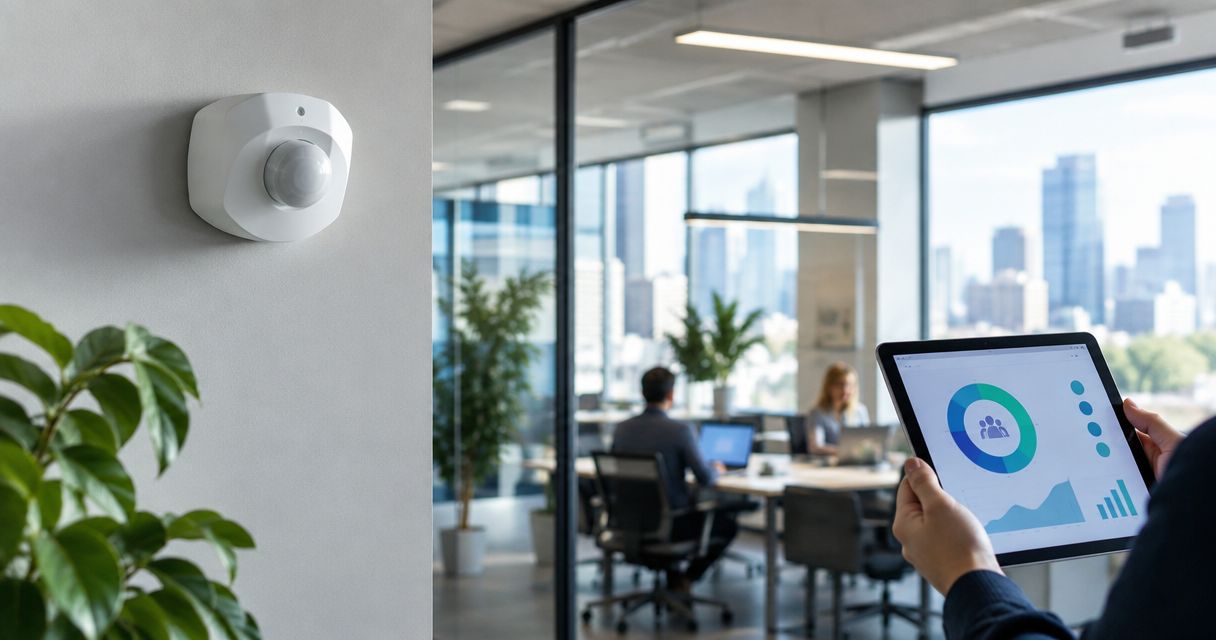
A passive infrared sensor detects changes in infrared radiation across its sensing zones. People moving through those zones generate activity events; the sensor does not continuously identify everyone within the room.
PIR is a clear fit when movement itself is the useful signal. In a corridor, it can indicate that someone passed through. At a seated workstation, silence from the sensor is not proof that the person has left.
PIR sensor pros:
- Provides a straightforward movement signal for activity monitoring.
- Works without collecting conventional camera images.
- Fits applications where event detection matters more than continuous presence.
PIR sensor cons:
- Can miss occupants who remain still.
- Depends on the field of view and movement through detection zones.
- Does not establish a room's headcount.
Best for: Corridors, circulation spaces and applications built around movement events.
If you convert PIR activity into an occupied/vacant state, your application needs an explicit timeout rule. That rule is an inference, not a measurement of departure. Shortening it increases the chance of declaring a quiet occupied space vacant; extending it delays the vacancy signal. Verdict: Buy for movement monitoring; skip as the sole evidence of vacancy in quiet rooms.
3. Thermal-array sensors: best for room headcounts
Thermal-array sensors measure spatial patterns of infrared radiation. Counting implementations interpret those patterns to estimate how many people occupy the detection area, rather than reporting movement alone.
They suit questions such as whether a room is used and how its measured occupancy compares with its intended capacity. The installation matters: people hidden behind others, partitions or furniture are harder to separate.
Thermal-array sensor pros:
- Can deliver headcount information rather than a simple activity event.
- Provides a way to assess room utilisation without conventional video imagery.
- Supports comparisons between occupied periods and measured attendance.
Thermal-array sensor cons:
- Counting depends on viewing geometry and the device's interpretation algorithm.
- Overlapping occupants and obstructions complicate detection.
- A claimed count capability does not establish accuracy in every room layout.
Best for: Meeting-room utilisation and applications that need a headcount within a defined area.
For a 2026 room-counting shortlist, request the documented mounting geometry and counting conditions alongside the output format. Evaluate seated groups, people close together and occupants near the detection boundary. Keep any thermal data handling separate from assumptions about anonymity. Verdict: Buy when headcount is the requirement and the installation matches the documented counting conditions.
4. Desk-level sensors: best for workstation utilisation
Desk-level proximity sensors assess a small detection zone associated with a workstation. Depending on the model, they use methods such as distance measurement or infrared sensing to help determine whether that desk is occupied.
This approach answers a different question from room presence. A room can be occupied while most desks remain unused, and a room-level sensor cannot identify which workstation generated its signal.
Desk-level sensor pros:
- Connects measurements to individual workstations.
- Supports desk-utilisation analysis rather than broad room activity.
- Allows you to assess specific desk layouts and detection zones.
Desk-level sensor cons:
- Bags, chairs and other objects can affect proximity-based interpretation.
- Different postures and desk arrangements change the sensing geometry.
- Installing and maintaining sensors across desks creates additional work.
Best for: Shared desks and workstation-level utilisation reporting.
Test the distinction between an occupied desk, an empty chair pushed beneath it and belongings left behind. Describe the output honestly: detecting an object in a desk zone is not the same as identifying a person. Verdict: Buy for desk-level analysis after validating the occupied/vacant rule against the actual furniture.
5. Doorway counters: best for entry and exit flows
Bidirectional doorway counters detect crossings and distinguish entry from exit. An application can use those events to maintain an estimated room count, provided it accounts for every relevant entrance and starts from a known state.
This approach suits traffic analysis at a defined boundary. It is less direct than measuring people inside the room because the current count depends on earlier crossing events.
Doorway counter pros:
- Measures arrival and departure patterns at an entrance.
- Keeps the sensing area focused on a defined crossing point.
- Supports flow analysis without instrumenting every desk.
Doorway counter cons:
- Missed or misclassified crossings cause accumulated count errors.
- Side-by-side crossings and people stopping in the doorway need evaluation.
- Unmonitored entrances undermine the inferred room count.
Best for: Entrance traffic and directional flow monitoring.
Separate the device's crossing detection from your application's count-reconciliation process. A negative or implausible occupancy estimate needs correction, not silent acceptance. Verdict: Buy for entry and exit analysis; hold for room occupancy until every entrance and reconciliation rule is covered.
How to connect occupancy data to building management
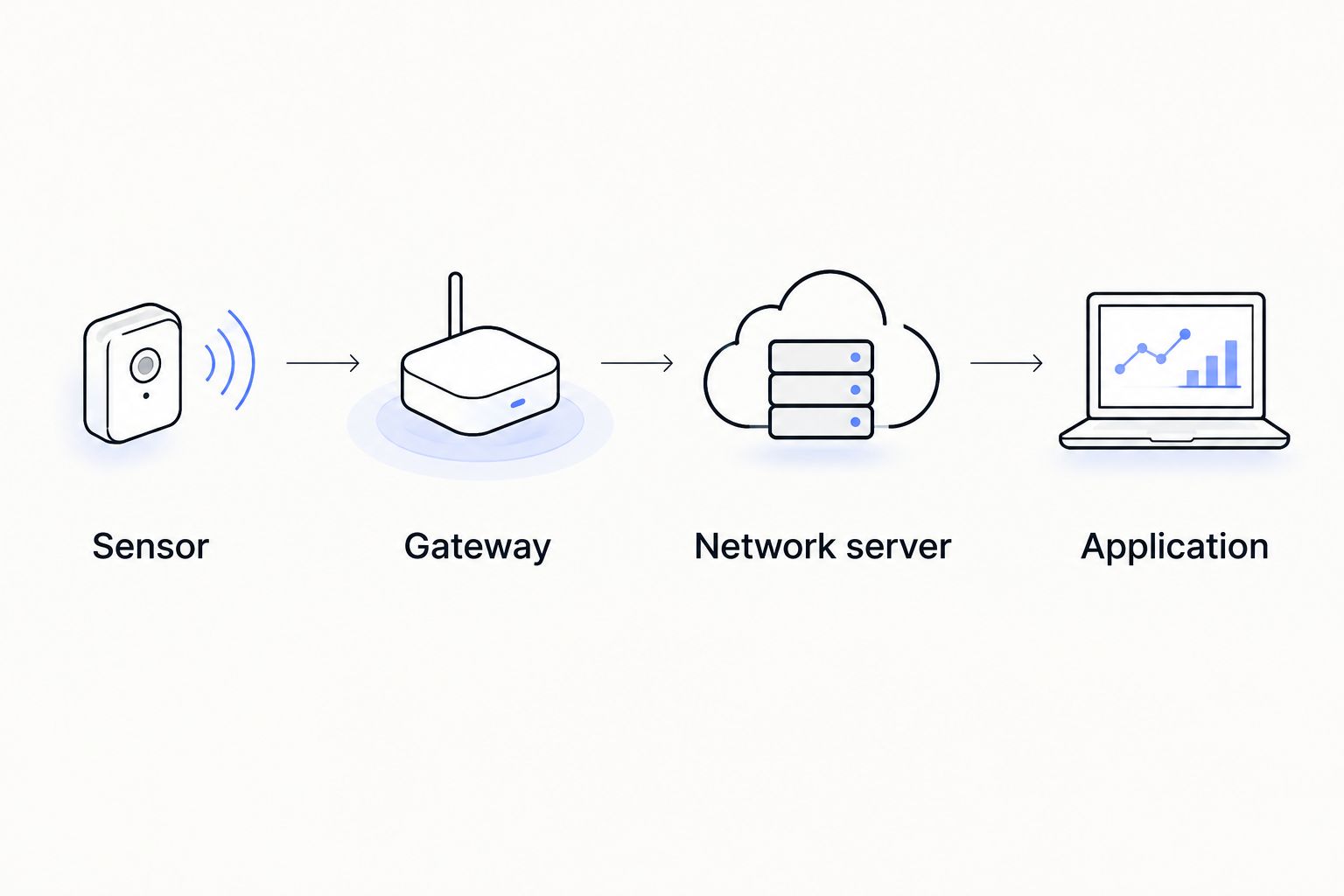
A LoRaWAN deployment has distinct responsibilities. Keep them separate when assigning installation work and comparing equipment:
- Sensor: Detects movement, presence, counts or desk status and encodes the reading.
- Gateway: Receives radio messages and forwards them through its network connection.
- Network server: Handles LoRaWAN network functions and delivers application data.
- Application: Decodes the payload, stores readings and turns them into reports or control decisions.
The gateway does not interpret occupancy merely because it receives a packet. Your application needs the correct payload decoder, device identity and mapping between each sensor and its physical location.
For a 2026 installation, match the sensor and gateway radio variants to the destination's requirements. Treat cellular backhaul separately: a gateway using a mobile connection still receives LoRaWAN sensor messages; it does not turn those sensors into NB-IoT devices.
Also distinguish utilisation reporting from immediate control. LoRaWAN reporting intervals, airtime constraints and the application path affect when a reading becomes actionable. Do not assign safety-critical or time-critical control to occupancy telemetry without a separately validated design.
Compare the complete installation, not just the sensor
Your purchasing comparison should cover mounting hardware, power arrangements, gateway connectivity, application integration and ongoing maintenance. A battery-powered device still needs access for replacement, while a wired sensor needs an appropriate supply and cable route.
Ask who maintains device credentials, decoders and location records. Someone also needs to investigate a silent sensor, distinguish communication failure from vacancy and update the application when furniture or room use changes.
Kilo Electronics is an online authorised dealer serving individuals, makers, professionals and businesses across Europe, including the EU, UK and Switzerland. That purchasing role is separate from designing or operating your building-management application.
For your 2026 purchase specification, record the required output, installation position, regional variant, power method and acceptance conditions. Use the same specification for every candidate so that different sensing approaches receive a fair comparison.
How the recommendations are ranked
The order follows the measurement criteria: continuous room presence first, then movement, headcounts, desk utilisation and entrance flows. It is a decision tree, not a claim that one technology outperforms every other technology.
No model-specific performance ranking is implied. Choose the sensing approach that matches your use case, then compare documented LoRaWAN models within that approach.
Which occupancy sensor should you choose?
Start with radar-based presence sensing for rooms where people sit still. Choose PIR when you need movement events, thermal-array counting when you need headcounts, desk sensors for workstation utilisation and doorway counters for entry and exit flows.
Do not add counting complexity when a binary presence signal answers the question. Equally, do not purchase motion detection and expect it to produce reliable attendance figures.
FAQ
What's the best LoRaWAN occupancy sensor for a meeting room?
Radar-based presence sensing is the first approach to shortlist for meeting rooms with seated occupants. Choose a documented LoRaWAN model whose stationary-person detection and detection zone match the room; use a counting sensor instead when attendance figures are required.
Is a PIR sensor the same as a presence sensor?
No. PIR detects changes in infrared radiation associated with movement, while presence sensing aims to establish whether someone remains in a space. A quiet PIR sensor does not prove that the room is empty.
Can a LoRaWAN occupancy sensor count people?
Only a model designed to provide people counts can answer that question. LoRaWAN is the communications method, so a movement-only or binary-presence device does not gain counting capability from its radio connection.
Do occupancy sensors need a LoRaWAN gateway?
LoRaWAN sensors need gateway coverage to send readings into the network. The deployment also needs a network server and an application that can decode and use the sensor payload.
Will a doorway counter give an accurate room occupancy figure?
A doorway counter gives an inferred room count based on entry and exit events. Every entrance needs coverage, and the application needs a known starting state and a way to reconcile missed or misclassified crossings.
Are non-camera occupancy sensors automatically anonymous?
No. Avoiding conventional camera images reduces the type of information collected, but location and time records can still reveal behaviour. Define access, retention and reporting rules for the resulting occupancy data.
Does Kilo Electronics manufacture occupancy sensors?
Kilo Electronics is an online authorised dealer of electronics and IoT hardware, not a sensor manufacturer. Its purchasing role is separate from the sensor manufacturer's documented capabilities and your application's integration requirements.
One last thing
Treat missing data as unknown, not vacant. A disconnected sensor and an empty room can otherwise produce the same dashboard result. Before using occupancy readings to change building operation, make the application show data freshness alongside the occupied/vacant state.